Mention a user or group
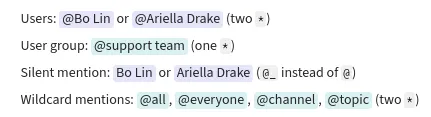
You can mention a team member or user group to call their attention to a message. Mentions follow the same notification settings as direct messages and alert words. A silent mention allows you to refer to a user without triggering a notification. A wildcard mention allows you to mention everyone on a channel, or mention all topic participants.
Mention a user or group
Section titled “Mention a user or groupâ€From the compose box
Section titled “From the compose boxâ€- Open the compose box.
- Type
@followed by a few letters from a name. - Pick the appropriate user or user group from the autocomplete.
- Tap the compose box at the bottom of the app.
- Type
@followed by a few letters from a name. - Pick the appropriate user or user group from the autocomplete.
From the user list
Section titled “From the user listâ€- Hover over a user’s name in the right sidebar.
- Click on their avatar or the ellipsis () to the right of their name to open their user card.
- Select Copy mention syntax to add it to your clipboard.
- Paste the user’s mention syntax in the compose box.
Via a message
Section titled “Via a messageâ€- Click on a user’s profile picture or name on a message they sent to open their user card.
- Select Reply mentioning user to start a reply to the conversation with a mention inserted into the compose box.
Silently mention a user
Section titled “Silently mention a userâ€You can use a silent mention to refer to a user or
group without drawing their attention. Silent mentions are displayed
without an @ in the message feed.
- Open the compose box.
- Type
@_(rather than just@), followed by a few letters from a name. - Pick the appropriate user or user group from the autocomplete.
Mention all topic participants
Section titled “Mention all topic participantsâ€Using the @**topic** mention, you can mention everyone who has previously
participated in the topic by sending a message or
reacting with an emoji. This lets you notify just those
who have already engaged in the conversation.
Users can disable notifications for @**topic** mentions by:
- Disabling notifications for wildcard mentions globally or for individual channels.
- Muting the topic or channel.
Mention everyone on a channel
Section titled “Mention everyone on a channelâ€You can mention everyone on a channel with the @**all** mention (or,
equivalently, @**everyone** or @**channel**). It’s best to use these mentions
only when your message requires timely attention from many channel subscribers.
An organization can be configured to
restrict wildcard mentions in large channels.
Users can disable notifications for @**all**, @**everyone**, and
@**channel** mentions by:
- Disabling notifications for wildcard mentions globally or for individual channels.
- Muting the topic or channel.
Examples
Section titled “Examplesâ€What you type
Users: @**Bo Lin** or @**Ariella Drake|26** (two `*`)User group: @*support team* (one `*`)Silent mention: @_**Bo Lin** or @_**Ariella Drake|26** (`@_` instead of `@`)Wildcard mentions: @**all**, @**everyone**, @**channel**, @**topic** (two `*`)What it looks like