Text emphasis
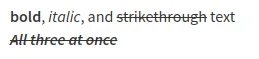
In Zulip, you can make text bold or italic, or cross it out with strikethrough.
Making text bold
Section titled “Making text boldâ€- Open the compose box.
- Select the text you want to format.
- Click the bold () icon at the bottom of the compose box.
- Open the compose box.
- To make text bold, use double asterisks (
**) around the text:**text**.
Making text italic
Section titled “Making text italicâ€- Open the compose box.
- Select the text you want to format.
- Click the italic () icon at the bottom of the compose box.
- Open the compose box.
- To make text italic, use single asterisks (
*) around the text:*text*.
Applying strikethrough formatting
Section titled “Applying strikethrough formattingâ€- Open the compose box.
- Select the text you want to format.
- Click the strikethrough () icon at the bottom of the compose box.
- Open the compose box.
- To apply strikethrough formatting, use two tildes (
~~) around the text:~~text~~.
Examples
Section titled “Examplesâ€What you type
**bold**, *italic*, and ~~strikethrough~~ text***~~All three at once~~***What it looks like